• Home
  • Products
    • Channel Manager
    • Revenue Management Service
    • Web Booking Engine
  • Company
    • About Us
    • Partners and Investors
    • Careers
    • News/Media
    • Reviews
    • Support
    • Contact Us
  • Integrations
  • Resources
    • Blogs
    • Ebooks
    • Case Studies
    • Guide
  • Login
    • Channel Manager
    • Booking Engine
    • Revenue Management System
    • Premium Rate Shopper
    • Property Management System
  • Request Demo
AxisRooms AxisRooms
AxisRooms AxisRooms
  • Home
  • Products
    • Channel Manager
    • Revenue Management Service
    • Web Booking Engine
  • Company
    • About Us
    • Partners and Investors
    • Careers
    • News/Media
    • Reviews
    • Support
    • Contact Us
  • Integrations
  • Resources
    • Blogs
    • Ebooks
    • Case Studies
    • Guide
  • Login
    • Channel Manager
    • Booking Engine
    • Revenue Management System
    • Premium Rate Shopper
    • Property Management System
  • Request Demo
  • Request Demo

Glimpse of the latest features in AxisRooms Channel Manager

Home NewsGlimpse of the latest features in AxisRooms Channel Manager
Glimpse of the latest features in AxisRooms Channel Manager

Glimpse of the latest features in AxisRooms Channel Manager

May 8, 2019 | Posted by AxisRooms | News | 0 comments |

In the past few months we have launched whole lot of new and exciting features for AxisRooms Channel Manager, which will help hoteliers in managing their properties with ease and get more out of it.

We are listing the new features below-

Master Report

Introducing the master report- Master report contains all the bookings information and which is specially designed for channel manager bookings. It will show Booking Engine bookings as well but the property should connected in our channel manager as OTA Axisrooms.

Search By Booking Id

Top search bar allows you to search the bookings by OTA reference id/ Booking id.

Date Selection

By default the current date is selected. The calendar contains sub fields like (Today, Yesterday, This week, This Month, Last Month, Custom Range). Based on user choice can able to select the date range.
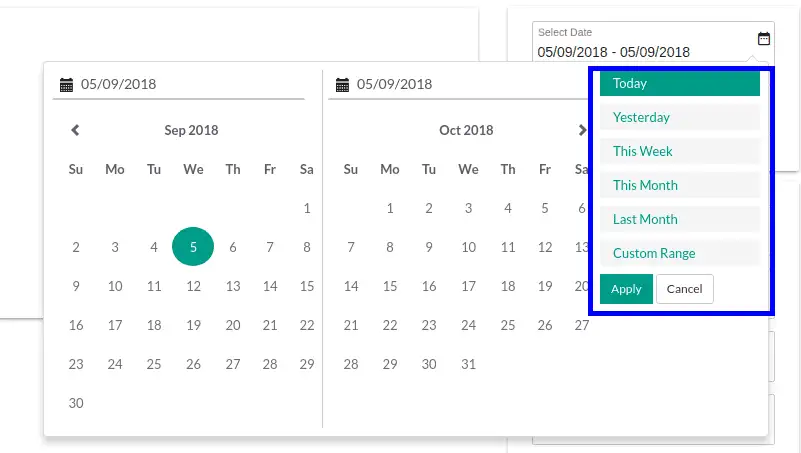
channel-manager-01

Search Filters

Following fields are mandatory to get the required details

  1. Hotel – Lists the corresponding hotels list active under that particular supplier in Select Hotel drop down.
  2. Channel – It contains list of all OTA’s which is supported by Axisrooms.
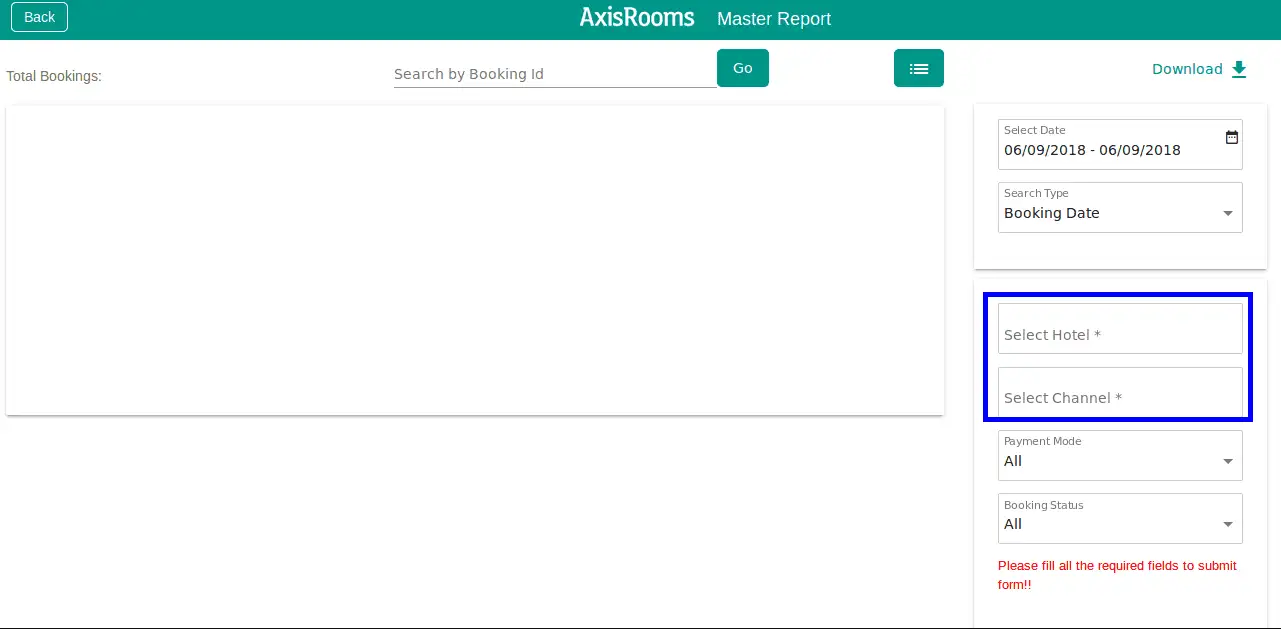
channel-manager-02

After successful selection of all required fields ,the submit button will appear once click on that will get required booking information on the dashboard.

Available Fields

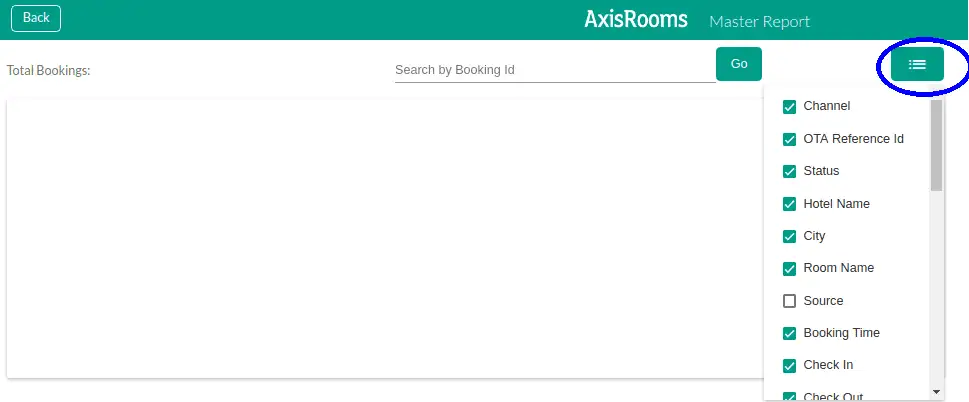
The report consists default and custom fields which is placed on right side (indicated as below picture)
channel-manager-03

The fields are (Channel, OTA Reference ID, Status, Hotel Name, City, Room Name, Booking Time, Check In, Check Out, No.of rooms, Mode of Payment, Total Amount). These will display by default for every booking information in the dashboard. There are additional fields also present.

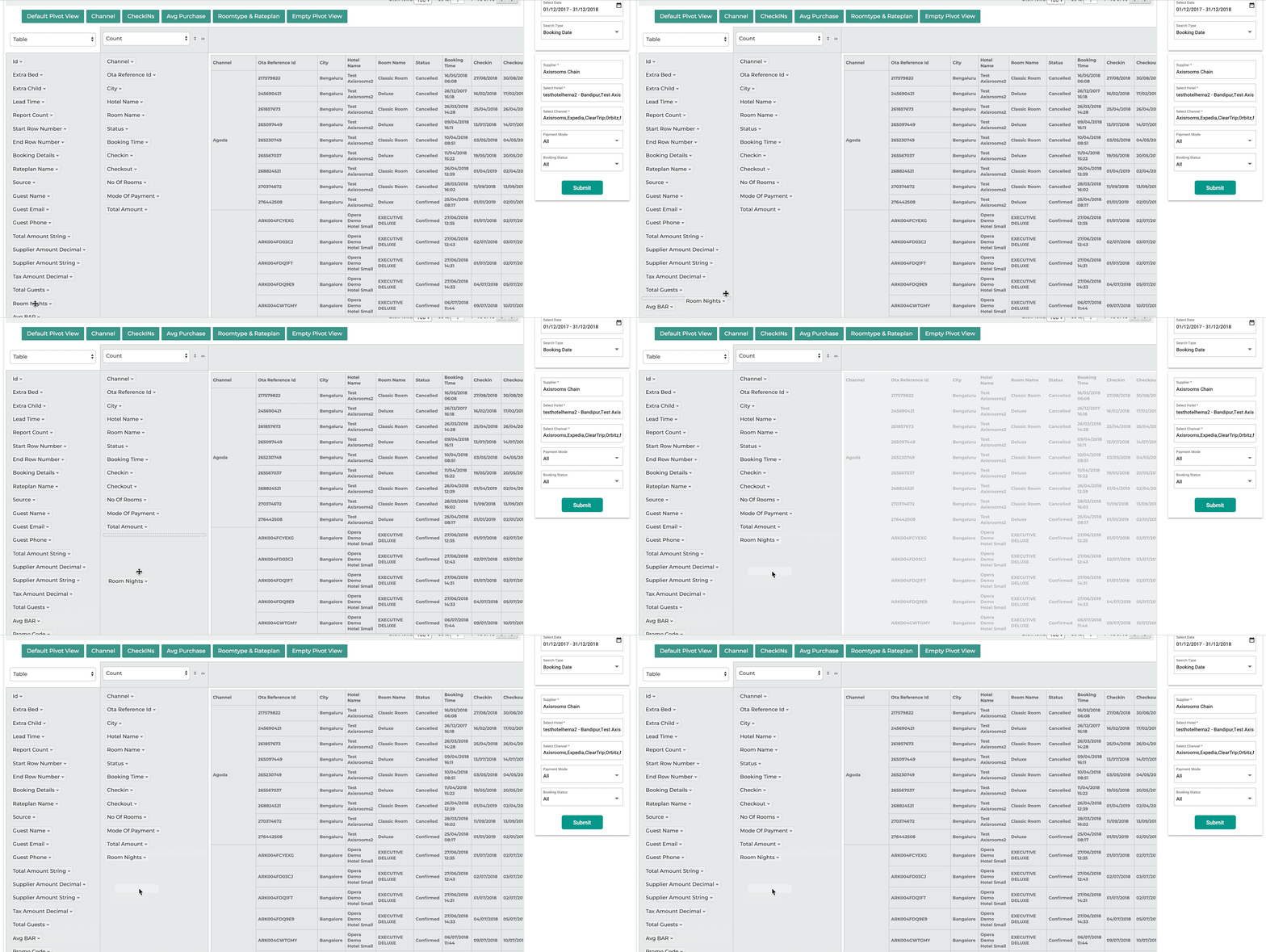
Pivot View in Master Report

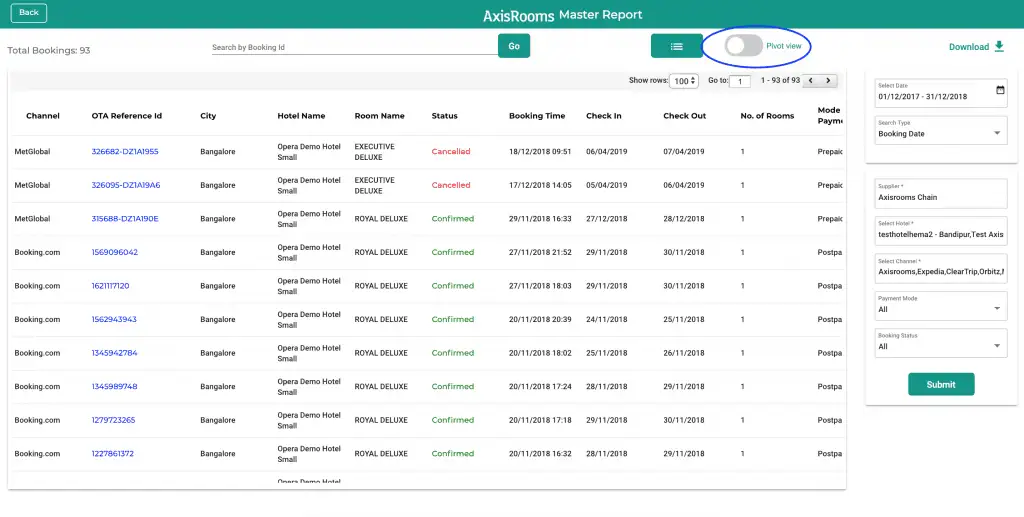
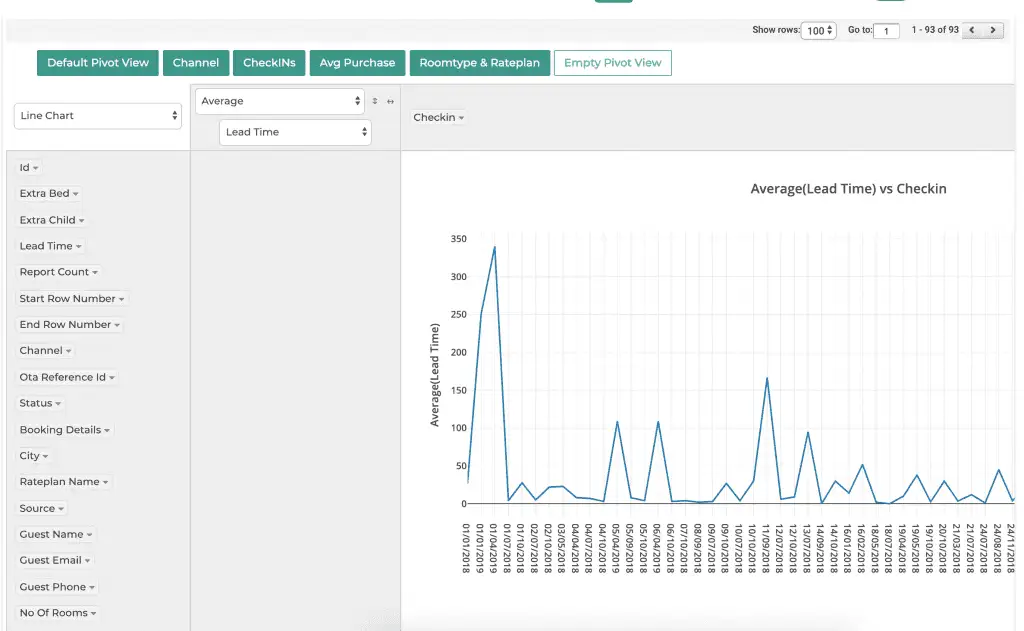
The pivot view in master report allows you to visualise the report data in the format that you like. We have created some standard presets which can help you with some quick analysis. Currently there are 4 presets, which you can toggle.
channel-manager-04

Use presets – Preset showing default view

channel-manager-05

Use Presets – Preset showing average lead time
channel-manager-06

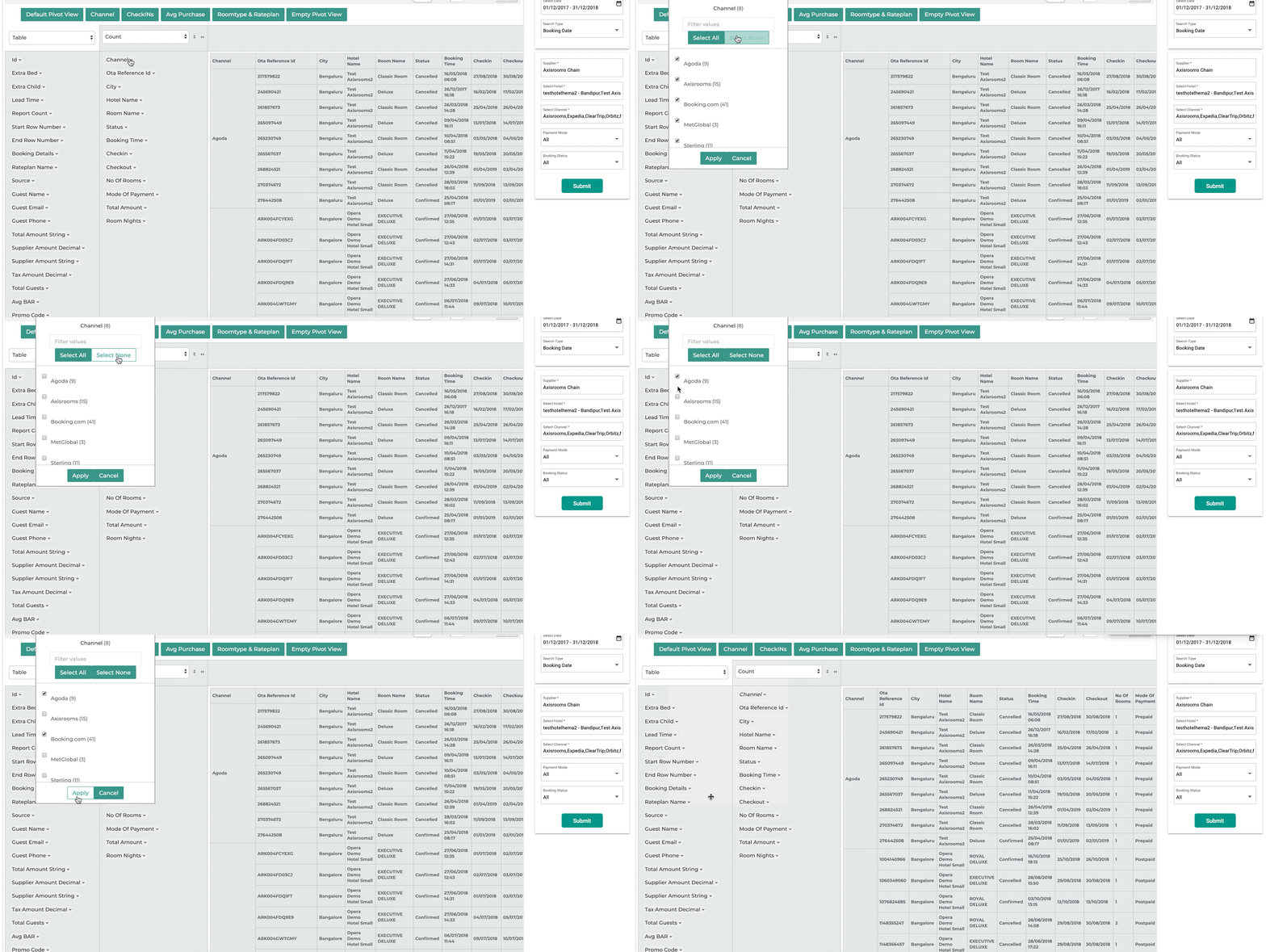
Drag and drop additional columns

Filter the data you would like to see
Push Notifications

Push Notifications is to notify the user (Support,Supplier,Supplier Admin) about-

  1. Confirmed Bookings
  2. Modified Bookings
  3. Cancelled Bookings

channel-manager-09

Messaging for Airbnb

If you are connected to the Airbnb channel, you can communicate with guests right from the channel manager.

The link to the messaging interface is available under profile. The link will only appear if any of your properties are connected with Airbnb.

channel-manager-10

We are constantly working towards a great experience for our customers. We are open to suggestions, if you have any suggestions do leave it in the comment box below.


 

Tags: Channel Managernew features
0 Comments
0
Share

About AxisRooms

This author hasn't written their bio yet.
AxisRooms has contributed 123 entries to our website, so far.View entries by AxisRooms

You also might be interested in

Way to get more online hotel booking

The next phase of online hotel booking looks promising: Are you ready to make more out of it?

Nov 8, 2021

The post-pandemic era holds “good time” for the travel and[...]

revenue-09

Glimpse of the latest features in AxisRooms Revenue Management System

May 9, 2019

In the past few months we have launched whole lot[...]

distribution-05

Hotel Distribution 2.0

Apr 11, 2019

In this post: We look at how hotel distribution has evolved[...]

Leave a Reply

Your email is safe with us.
Cancel Reply

Request A Demo

News and Media Request Demo

Testimonials

We have been using AxisRooms’ Channel Manager Solution for over eight years and are delighted with its features and functionalities. It saves us time with automated and real-time distribution and has helped us eliminate overbookings. Their support is excellent.

Indika Perera, System Coordinator, Rajarata Hotels, Anuradhapura
AxisRooms
AxisRooms App AxisRooms App

Sign up for Our Newsletter

Be the first to hear about our announcements, get important news, amazing offers & inside scoops

    AxisRooms pci AxisRooms ssl

    Company

    • About Us
    • Investors
    • Careers
    • News/Media
    • Support
    • Reviews
    • Contact Us
    • Privacy Policy
    • Terms and Conditions

    Products

    • Channel Manager
    • RM as Service
    • Web Booking Engine

    Axisrooms

    A complete suite of products for the hospitality industry

    Headquarters

    • 3287, Sriram Samanthu Chambers, 3rd Floor, 12th Main, Indiranagar, Bengaluru, Karnataka 560038

    Sales

    • +91-9880330001
    • sales@axisrooms.com

    Support

    • +91-7026568280
    • support@axisrooms.com

    For support escalations

    • Arun
    • +91-9972181199
    • arun@axisrooms.com

    Contact Support

    • +91 8067488900
    • +91 8067417900
    • support@axisrooms.com
    Prev Next